 Hexomap
Generate a world. Paint every hex. Bring it to the table.
Hexomap builds whole continents from tectonic plates — with rivers, kingdoms, towns, roads and names — then lets you paint, label and annotate every hex in a hand-illustrated style. Maps up to 4096 × 4096 hexes stay smooth to pan and zoom.
Windows 10 & 11 · The demo never expires · Full version $15, one-time — no subscription.
Continents that make geological sense
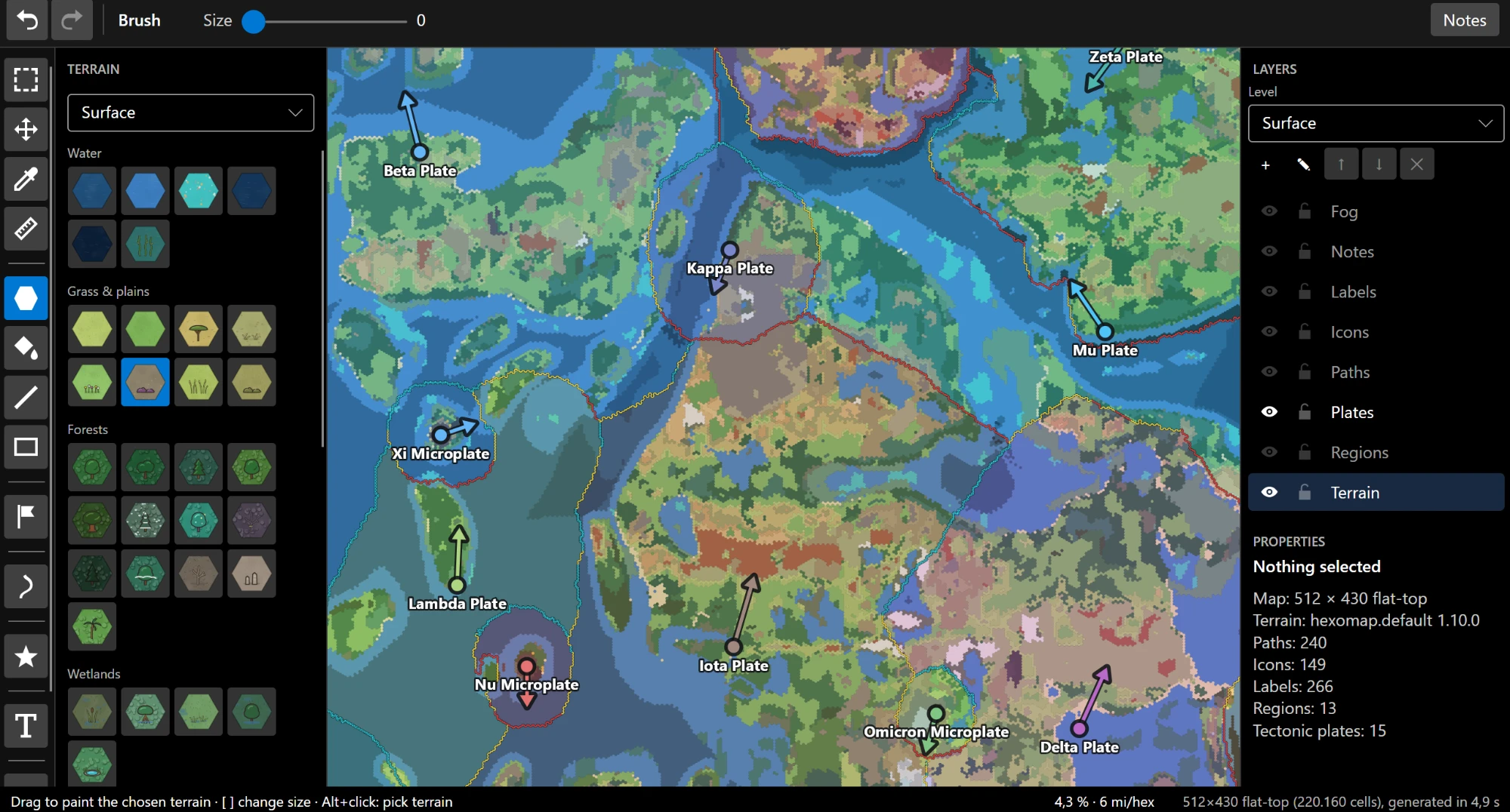
Start from random tectonic plates. Hexomap pushes up mountains at active margins, scatters microplates, and places climate-driven terrain from tundra to jungle. Rivers run downhill along the path of least resistance.
- One continent per plate, with drift arrows you can inspect Full
- Lakes, islands and naturally varied coastlines
- Kingdoms and provinces with names from a culture per kingdom
- Settlements and roads that connect them
- Presets with a live preview — or regenerate just a selected area
Looks hand-drawn, stays editable
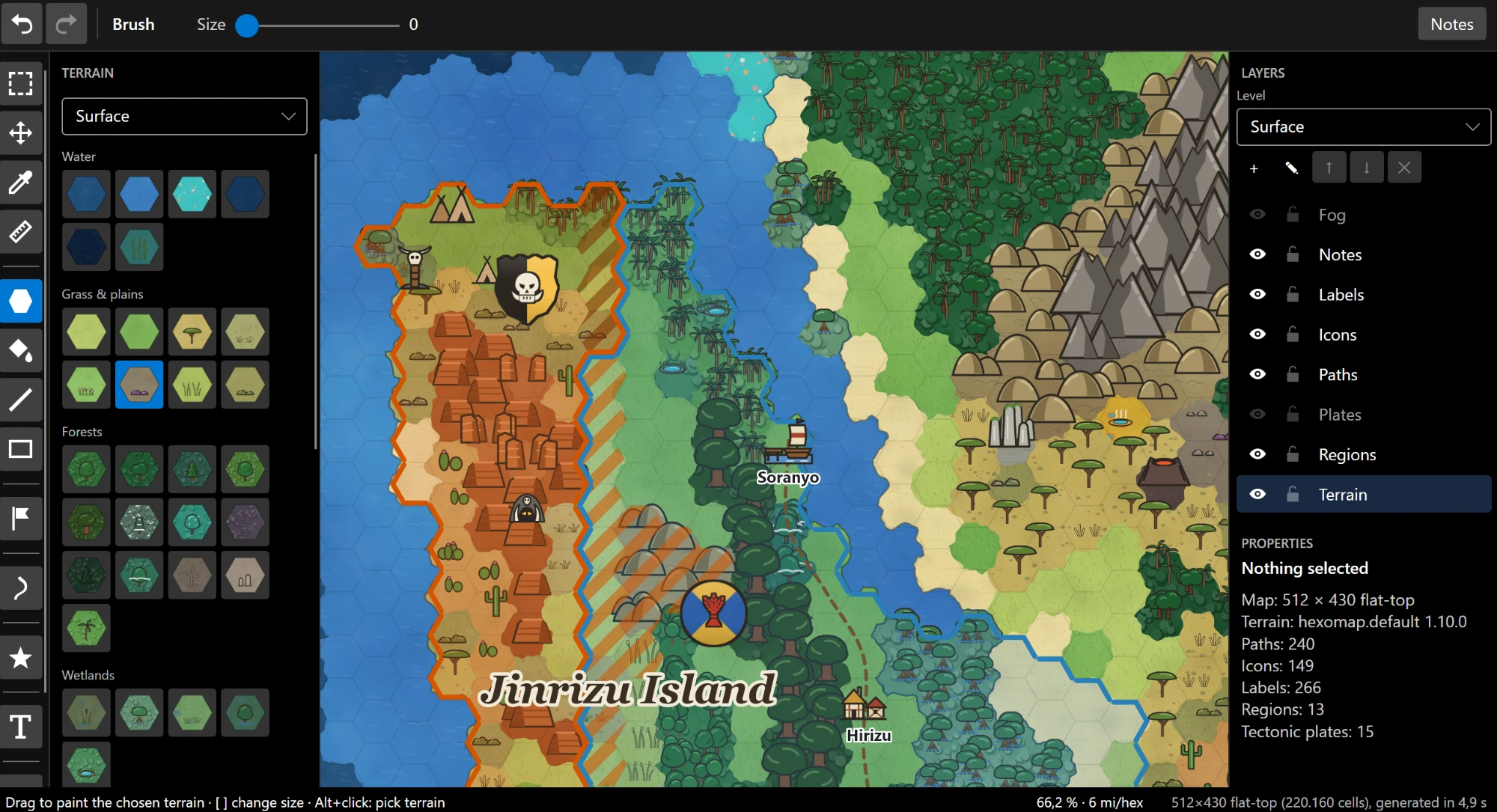
Textured terrain with hand-drawn edges, illustrated symbols for every terrain type, and themes that restyle the whole map at once. Kingdoms get coats of arms that match the icon theme; disputed land shows as contested stripes.
- Landscape, fantasy and themed terrain sets
- Icon themes with a theme picker
- Labels for places, regions, seas, lakes, mountain ranges and islands
- Coats of arms per region, generated or designed by you
All features
One editor for the whole job: generate, paint, annotate, play, export. Everything is in the free demo except the items marked Full, which need the full version.
World generator
- Tectonic plates — mountains, volcanoes and island chains along plate boundaries Full
- Natural landmass shapes and coastlines
- Terrain placed by climate: cold, temperate, hot
- Rivers from high ground, plus lakes
- Kingdoms & provinces as regions
- Settlements, roads and culture-based names
- Presets with live preview
- Generate into a selected area only
Painting tools
- Brush with adjustable size
- Flood fill, contiguous or whole map
- Line and rectangle tools
- Eyedropper and Alt+click to pick terrain
- Selection with cut, copy, paste and delete
- Full undo / redo
- Grouped terrain palette with compact hex swatches
Map content
- Icons — place, move and delete anywhere
- Paths: rivers, roads, trails, sea routes, dotted lines
- Labels with thin halos for readability
- Regions with borders, contested-land stripes
- Coats of arms per region, with an editor
- Detailed coats of arms: partitions, furs, patterned fields, several charges Full
- Notes on hexes, objects and the map
- Map levels — surface, underground and more
Style & assets
- Illustrated style with textures and hand-drawn edges
- Landscape, fantasy and themed terrain sets
- Icon themes with 90+ icons
- Tundra, snowy hills, charred land, mushroom forest…
- Installed asset packs and art themes Full
- Flat-top or pointy-top hexes
At the gaming table
- Fog of war — hide all, reveal as players explore Full
- A players' window for a second screen Full
- View-only mode to show the map to players
- Map scale and a measure tool (e.g. 6 mi/hex)
- Layers you can show, hide and lock
- Number keys 1–9 jump to map regions
- Works fully offline — the licence key is checked on your computer
Big maps & files
- Maps up to 512 × 430 hexes in the demo
- Maps up to 4096 × 4096 hexes, rendered in background tiles Full
- PNG export up to 2,048 px in the demo
- PNG export of the whole map, streamed for very large maps Full
- Increase map size while keeping hex coordinates Full
- Native .hexomap files, recent files, unsaved-changes prompt
- Installer with automatic updates
- Portable version that runs from a folder
Demo & full version
The demo is the real app, not a time-limited trial. Make as many maps as you like; buy a licence key when you need tectonic plates, bigger worlds or fog of war. Your maps carry over as they are.
Free demo
$0 free forever
Everything you need to build a campaign region.
- World generator: terrain by climate, rivers, lakes, kingdoms, provinces, settlements, roads and names
- All painting tools, icons, paths, labels, regions, notes and map levels
- Simple coats of arms for every region
- Illustrated style with all built-in terrain sets and icon themes
- Maps up to 512 × 430 hexes (Small and Medium presets)
- Layers, map scale, measure tool and view-only mode
- PNG export up to 2,048 px per side
- Never expires
- Tectonic plates
- Maps larger than 512 × 430, and increasing a map's size
- Fog of war and the players' window
- Detailed coats of arms
- PNG exports larger than 2,048 px
- Installed asset packs and art themes
Hexomap full
$15 one-time payment · no subscription
For continent-spanning campaigns and running sessions.
- Everything in the demo
- Tectonic plates: mountains, volcanoes and island chains along plate boundaries
- Maps up to 4096 × 4096 hexes (Large and Huge presets)
- Increase map size, keeping existing hex coordinates
- Fog of war: hide all, reveal as players explore
- A players' window for a second screen at the table
- Detailed coats of arms: partitions, furs, patterned fields and several charges
- PNG exports up to the full map at any detail
- Installed asset packs and art themes
- Unlocks the app you already installed — enter the key under Help → Licence
- Works fully offline — the key is checked on your computer
We love that you would support us by buying the full product. Unfortunately we are still working on setting things up. For now you can use the free version.
Get Hexomap for Windows or Linux
One download for both: it starts as the demo and becomes the full version when you enter a licence key.
Installer (recommended)
Installs for your user account — no admin rights needed. Adds a Start menu shortcut and keeps itself up to date.
Hexomap-win-Setup.exePortable
Unzip and run from any folder or USB stick — handy for the laptop at the gaming table. Updates itself too.
Hexomap-win-Portable.zipLinux
Unpack and run, or run install.sh for a menu entry. Doesn't update itself: download the next one when it's out.
Windows SmartScreen may show “unknown publisher” the first time you run the installer. Choose More info → Run anyway.
FAQ
Is the demo time-limited?
No. The demo runs forever and has every painting tool and the world generator. The full version adds tectonic plates, maps larger than 512 × 430 hexes, increasing a map's size, fog of war and the players' window, detailed coats of arms, PNG exports larger than 2,048 px, and installed asset packs and art themes.
Do I need to reinstall after buying?
No. Open Help → Licence…, paste the key from your order e-mail and click Activate. The window title stops saying “(demo)”.
Do maps made in the demo open in the full version, and the other way round?
Yes. Demo maps open in the full version unchanged, and maps made in the full version still open in the demo.
Does Hexomap need an internet connection?
No. Your licence key is checked on your computer, so Hexomap works without a connection — fine for a weekend at a cabin or a convention hall with no Wi-Fi.
Is there a Mac or Linux version?
There is a Linux version (64-bit, a download you unpack and run; it doesn't update itself, so download the next one when it's out). There's no Mac version yet.
Join us on Discord
Share your maps, ask questions, report bugs and help decide what Hexomap does next.
Your next campaign starts with a map
Generate a world in seconds, then make it yours. Free to try, no sign-up.